@hotrod The update is free of charge for those who already purchased v2.0.0. When someone buys the software, they receive an email from ko-fi with a link. That can be used to access the files at any time, and the new ones are available there. So, if you bought it, use that link you received and the updated files will be available without the need to buy it again.
Just purchased V2 version. Big thank you, you have done a great job! Is there any way to clone multiple similar versions of you, the Amiga community would be very happy!
Kyvos 2.2.0 got released. Here is a list of what changed
## [2.2.0] - 2026-06-10 ### Added - Added an option in "Graphics device" field to select vmware on AROS systems - Added support for the Virtio9PFS shared folders - Added support for the VirtualSCSIDevice by derfsss (https://github.com/derfsss/VirtualSCSIDevice). Now it is possible to set which disk images will be mounted with the SCSI devices by enabling the checkbox beside the paths. - If the VirtualSCSIDevice.lha is placed in the same folder with the AmigaOS 4.1 FE ISO, it will be included during the creation of the kickstarter.zip file automatically. It needs to be downloaded from the [VirtualSCSIDevice releases](https://github.com/derfsss/VirtualSCSIDevice/releases) and renamed to VirtualSCSIDevice.lha. This is a process that is happening when an AmigaOS 4.1 FE system is created, emulated on AmigaOne XE or Pegasos 2. Those are the only ones supported by this method. If you are emulating a Sam460ex, the installation needs to be done manually before using the SCSI options. - Added a Kickstart editor for existing AmigaOS 4 kickstart.zip files. It can open and rebuild the archive, preserve the kicklayout order, show detected component versions, add files by requester or drag and drop, remove and reorder entries, enable or disable modules, extract the current contents to a folder, and save the result with a timestamped .bak backup of the original archive. - Added support for MorphOS 3.20
### Changed - Now the "Graphics device" field contains only the valid values per system - If the ati-vga driver is placed in the same folder with the AmigaOS 4.1 FE ISO, it will be included during the creation of the kickstarter.zip file automatically. It needs to be downloaded from [http://zero.eik.bme.hu/~balaton/qemu/amiga/](http://zero.eik.bme.hu/~balaton/qemu/amiga/) and renamed to qemu-ati-vga-driver.zip. This is a process that is happening when an AmigaOS 4.1 FE system is created, emulated on AmigaOne XE or Pegasos 2. Those are the only ones supported by this method.
### Fixed - The AROS system was not booting correctly from the ISOs, and I changed the ide devices to sata (ahci) which solved the issue - Fixed VMs being shown as running after a crash or unexpected exit by deleting the PID file when QEMU exits and verifying the process is actually alive (via /proc) on startup before trusting a stale PID file
In case you are not a subscriber to my YouTube channel, the last weeks I shared videos about using Kyvos and the last one has information about the new features coming with v2.2.0, showing how to add drivers (like the ati-vga, the scsi one etc.) and how to set up Virtio9pfs on your system.
@walkero Please always use the URL in my signature (qmiga.codeberg.page), it will redirect to the correct page. Besides easier to remember it will also continue to work if I ever have to move the page.
These days, I am celebrating 1 year since Kyvos was first released, and I provide a 15% discount to Kyvos v2, if you use the following link to buy it. https://ko-fi.com/walkero/link/AUG15-BDAY
Ahahahaha! My usual luck! I bought Kyvos at full price right the day before the discount... Anyway, great job — setting up an emulated environment took me just a few minutes, really easy and fast.
Congratulations, really!
While I'm at it, I'd like to ask you a couple of things I couldn't find in the documentation:
1) The virtual USB device doesn't seem to get updated once AmigaOS has booted. That is, if on the host side (a Mac) I add files to the folder set as the USB source, they don't appear on the Amiga side. I actually have to shut down the VM and turn it back on for them to appear.
2) Also regarding USB, is there a way to make other USB devices visible to the emulated Amiga? That is, if I plug a pendrive into the host, is there a way to make it visible to the emulated Amiga and then "eject" it once I'm done?
3) I gather that the configuration emulating the Sam460ex can only use the (emulated) graphics driver of the card. Is it not possible (or maybe planned for the future) to emulate a different Radeon graphics card, as with the configuration emulating the AmigaOne?
Ok, I said a couple — turns out it's actually three.
My usual luck! I bought Kyvos at full price right the day before the discount...
Thanks for the extra support :D I am glad you like it
Quote:
1) The virtual USB device doesn't seem to get updated once AmigaOS has booted. That is, if on the host side (a Mac) I add files to the folder set as the USB source, they don't appear on the Amiga side. I actually have to shut down the VM and turn it back on for them to appear.
2) Also regarding USB, is there a way to make other USB devices visible to the emulated Amiga? That is, if I plug a pendrive into the host, is there a way to make it visible to the emulated Amiga and then "eject" it once I'm done?
To be honest with you, I never experimented with that. It might be possible, but it also will need extra arguments to be set to qemu when it is started. If you find how to do it, you can set those arguments in kyvos from the Custom arguments field, by right-clicking on the vm name and selecting "QEMU arguments" from the menu.
I will also add it in my to-do list to investigate.
Quote:
3) I gather that the configuration emulating the Sam460ex can only use the (emulated) graphics driver of the card. Is it not possible (or maybe planned for the future) to emulate a different Radeon graphics card, as with the configuration emulating the AmigaOne?
I believe I tried the ati-vga by Balaton on an emulated SAM 460 and it didn't work. But in the past I also tried the beta version of the A-Eon virtio-gfx driver and I know that this works. But this is not publicly available yet. So yes, this is possible. The difference with the Pegasos 2 and AmigaOne is that the installation and configuration of the kickstart files should be done manually inside the hard disk, as the Sam 460 doesn't use external kickstart archive, like the others do. So, it is not possible to be changed by Kyvos, right now.
Feature request for Windows version, could it create or tell me how I would load straight into a VM OS setup without loading up Kyvos, kinda like how WinUAE you can just click on a .UAE config file and it load into that setup.
Im basically been build my new Amiga, and got it recently set up to go straight into different WinUAE config/settings on inserting a Floppy disk with a NFC chip. ( https://amigang.com/modernising-the-disk-drive-with-a-nfc/ ) So I dont have to see WinUAE interface. It make feel more like its just Amiga Im loading into.
I hope I can do the same with this and have my MorphOS, AmigaOS4 and Aros setup load straight into it. Cheers
Why don't you take the QEMU command and arguments as generated from Kyvos and put it in an executable script. Kyvos provides that if you right-click on the VM's name, there is an option for it.
1) The virtual USB device doesn't seem to get updated once AmigaOS has booted. That is, if on the host side (a Mac) I add files to the folder set as the USB source, they don't appear on the Amiga side. I actually have to shut down the VM and turn it back on for them to appear.
Maybe you could eject and re-add it from QEMU Monitor to update it but using the 9p share or a network share with e.g. SMB FS is better as those don't have the limitations of the simple USB share.
Quote:
2) Also regarding USB, is there a way to make other USB devices visible to the emulated Amiga? That is, if I plug a pendrive into the host, is there a way to make it visible to the emulated Amiga and then "eject" it once I'm done?
This is documented in the QEMU docs: https://www.qemu.org/docs/master/system/devices/usb.html You can pass through host devices with device_add usb-host,need-some-ids-here... but you may need to run QEMU as root or make sure your user has access to the /dev/bus/usb/xxx files corresponding to the passed through device and make sure the host does not access the device concurently with the guest so you may need to unload host driver before passing through or unbind it from driver. This should also work on Windows but needs QEMU compiled with usb-host support that may need libUSB or use WSL with a Linux QEMU version. I don't know Windows but it's likely documented somewhere.
Quote:
3) I gather that the configuration emulating the Sam460ex can only use the (emulated) graphics driver of the card. Is it not possible (or maybe planned for the future) to emulate a different Radeon graphics card, as with the configuration emulating the AmigaOne?
I'll need to look at that eventually but I had no time for it recently. I know the sam460ex firmware had problems with PCIe cards as PCIe is not emulated but it may work with ati-vga but you need to replace the driver in the installed Kickstart dir as sam460ex does not use Kickstart.zip and bboot but boots normally from firmware like the real machine so you need to change the installed Kickstart dir in the guest. Just replacing the Radeon.chip driver in SYS:Kickstart and adding -device ati-vga,romfile="" to QEMU command line may work but I haven't tried.
There is more info and FAQ on my page at the link in my signature below.
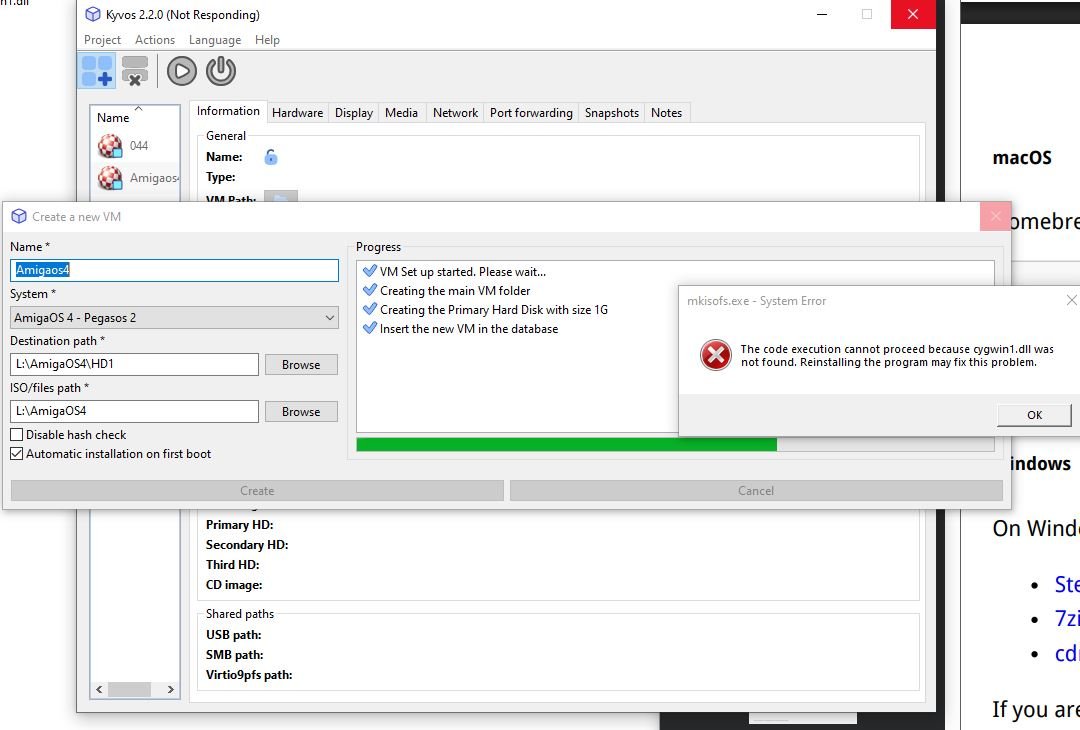
But it is in the folder C:\Program Files (x86)\cdrtfe\tools\cygwin
I did try reinstall, same problem. - Anyway I though well do it with out this, following the pdf instruction again, but notice things wrong on Version 2.2 of the read me guide for Pegasos 2 system.
You seem to have removed the separate guide for different AmigaOS system, and tried to combine it to one. But some of the things are different for each system, like page 47, it say select a1ide.device, but that not what it is in Pegasos system its peg2ide, now i know most users common sense would kick in, but I feel this change is step back to how good your guide was for different system, plus the guide is quite different from them that point on for systems,
in manual 2.2, on page55 you have links to the old Create a Pegasos2 Virtual System to Run AmigaOS 4 and Create an AmigaOne Virtual System to Run AmigaOS 4, but they no longer work.
I decided to not do the install yet, but If do would the old guide in 1.7 still be correct. Cheers
Thank you for all these comments. I will check the manual and improve the content to be more accurate. I removed the section for the pegasos as the steps are mostly the same.
Yes, the manual of Kyvos v1.8 is still available and accurate.
About the mkisofs.exe, did you download the package that is mentioned in my manual, and that didn't work? The one from https://cdrtfe.sourceforge.io/cdrtfe/download_en.html ? Did you set the environment variables as well, so that the cygwin can be found?
Did you set the environment variables as well, so that the cygwin can be found?
oops, I thought I had, but added it to the "User" Path and not the "System Variable" path. my bad, its worked now.
Does this automated setup use ati-vga driver, or do i still set that up. Plus do yo have any news on A-EON Driver, I forgot to ask Trevor at Kickstarter


 News feed
 OS4 Feedback forum
 OS4Depot Feedback forum
 AmiCygnix forum
 ABC shell forum
 AmiKit forum
 Cinnamon Writer forum
 CodeBench forum
 Digital Universe forum
 Dopus 5 forum
 E-UAE forum
 Gnash forum
 Ibrowse forum
 JAmiga forum
 Odyssey forum
 OWB forum
 Qt forum
 SmartFileSystem forum
 Timberwolf forum
 TouchDevice forum
 TuneNet forum
 Unsatisfactory Software forum
 Donate


 I bought Kyvos at full price right the day before the discount... Anyway, great job — setting up an emulated environment took me just a few minutes, really easy and fast.