@NBache As i say you should install beta7 to a fresh new directory, and then conf by conf update it if you wish from old install. In new one not only new pixman library come, but also useragent.prefs, which contain all the old spoofing string with the same names as before, and they looks the same in menu.
@All Recieved another report from another user, who find that "default setting" of spoofing behaviour ununtiutive and unlogical.
What about we just make it as ktadd say : removing it at all, and let the pref's spoofas default reflects in the menu ?
I.e. we can do it like this:
1. Remove "deafult settings" from spoof as menu. The preferences "default" will then reflect the actual default in menu and mark it.
2. Instead of "default settings" we create "environment seting". Then, that one will be marked, if OWB_USER_AGENT set or used.
And then everything clear and understandable.
Just as it now its really non-user logic, but programmer-reverse-logic :)
@Javier Quote:
IIRC you can have a default useragent, that doesn't show in menu.
Also, we can make that set "default' will automatically make it as "shown in the menu" , too.
I have a request too, continuing from Niels' comment.
Would it be possible to add the site to URL settings you are currently on?
In Windows/URL Settings... and then Add should add the current site or add a new button which explicitely says Add current
I get it that the latter would be more intruisvie and more work.
Yes, i know i can "simply" c&p the site address, but that's the easy way out.
@nbache
Thanks for the heads up. URL settings was just what i was looking for after struggling with some site who refused to open an ASL requester on uploading files. Setting the spoof to "Odyssey browser" fixes it strangely.
1)Prefs SPOOF AS just let the user add useragents and from such list, then activate/enable the DEFAULT and let other be shown on the MENU.
2)The MENU has the list of SHOW IN MENU items from the list and let the user change the useragent to use to the site/web page is browsing.
By default the one selected is the DEFAULT in 1)
Maybe a little explanation/decription can be added to prefs SPOOF AS page, so if someone can elaborate a clear/easy/short explanation I'll add it.
EDIT: I won't deny is a bit compicated first, but thats how is/was implemented from beginning, I only added the option to add new useragents without a full recompile of Odyssey.
And we need spoofing, 'cos we use an old webkit engine IMHO, to fake sites/webs we use an "updated"/compatible web browser.
Then if a site/web doesn't load looks ok, then use MENU spoof list to use whatever useragent you want and reload page. When you find the "correct" useragent, then use URL PREFS. to indicate the URL and SPOOF to be used.
@Javier I still don't get it. And if i didn't get it , it mean casuall users will not too, and we need to do something about for sure. Name it differently, rework, or whatever.
Quote:
1)Prefs SPOOF AS just let the user add useragents and from such list, then activate/enable the DEFAULT and let other be shown on the MENU.
Why we need that way ? Prefs SPOOF AS should let the user choice what they want right now, and "default" should be reflected in the menu. And that all. Other ones can be shown, or not shown, does not matter. Just if you set as default anything from the spoof preference, then it will be shown in the menu in any case.
Quote:
2)The MENU has the list of SHOW IN MENU items from the list and let the user change the useragent to use to the site/web page is browsing.
Yes, and then we can made that if any entry was set as "default", then it will automatically be "show in menu" and can't be changed until default is set.
Quote:
Then if a site/web doesn't load looks ok, then use MENU spoof list to use whatever useragent you want and reload page. When you find the "correct" useragent, then use URL PREFS. to indicate the URL and SPOOF to be used.
When you choice then any new "SPoof as", it then changes as expected in menu + change the default in the preferences until restart. And all logical then : everything reflect each other and all fine.
The DEFAULT is the "DEFAULT SETTINGS" in menu. I know you wan't that ex. I select Firefox3.6 as default in prefs spoof as, and then on menu Firefox3.6 shows selected/marked.
EDIT: BTW should URL PREFS useragents cyclegadget show all useragents, not just the one user selected to be shown on menu?
Will see if it could be changed to such mode/behaviour.
Just firstly we need to discuss it with everyone, so everyone agree before doing any changes :)
Quote:
I know you wan't that ex. I select Firefox3.6 as default in prefs spoof as, and then on menu Firefox3.6 shows selected/marked.
Yeah, if we set "default" in the preferences of spoofing, then, that default can't be "not shown in menu" , but automatically always shown in menu.
Also, if we set in "spoof as" anything else, then, it also set "default" in the preference taking from menu, and keep it all like this till we restart (so back to saved default"), or press save sometime so it will remember our default.
Point is that we reflect default be it from prefs, or be it from spoof as.
And at then end of the spoof as list in menu, we change "default" on the "environment as default". So those who set environment for, will have it default only when it set.
That latest part need to discuss a bit more to find cleaner and clever way.
Ok, no problem, but I not sure if some change in MENU (javascript, images, spoof as,...) should change PREFS (window options), if it's that what you mean.
If you launch a pre beta07 version you should see those spoofing useragents in URL prefs. Then in beta07, just go to new prefs->SpoofingAs and enable (show in menu) those useragents that you have/use in URL prefs.
"Problem" is that url perfs (url.prefs file) only saves the index of the useragent not the full string.
Pre beta07 no problem, all was hardcoded into Odyssey and you couldn't change/add/remove spoof useragents.
So if you have a different "enabled" usersgentlist it will change/use the "enabled" useragent at index <number> of the list in prefs->SpoofingAs.
Just if you hex edit/view url.prefs (0x01 usezd as delimeter of each option): <url_pattern>0x01<javascript>0x01<images>0x01<plugins>0x01<useragent>0x01...
the 5th value/number after the <url_pattern> is the index of the useragent.
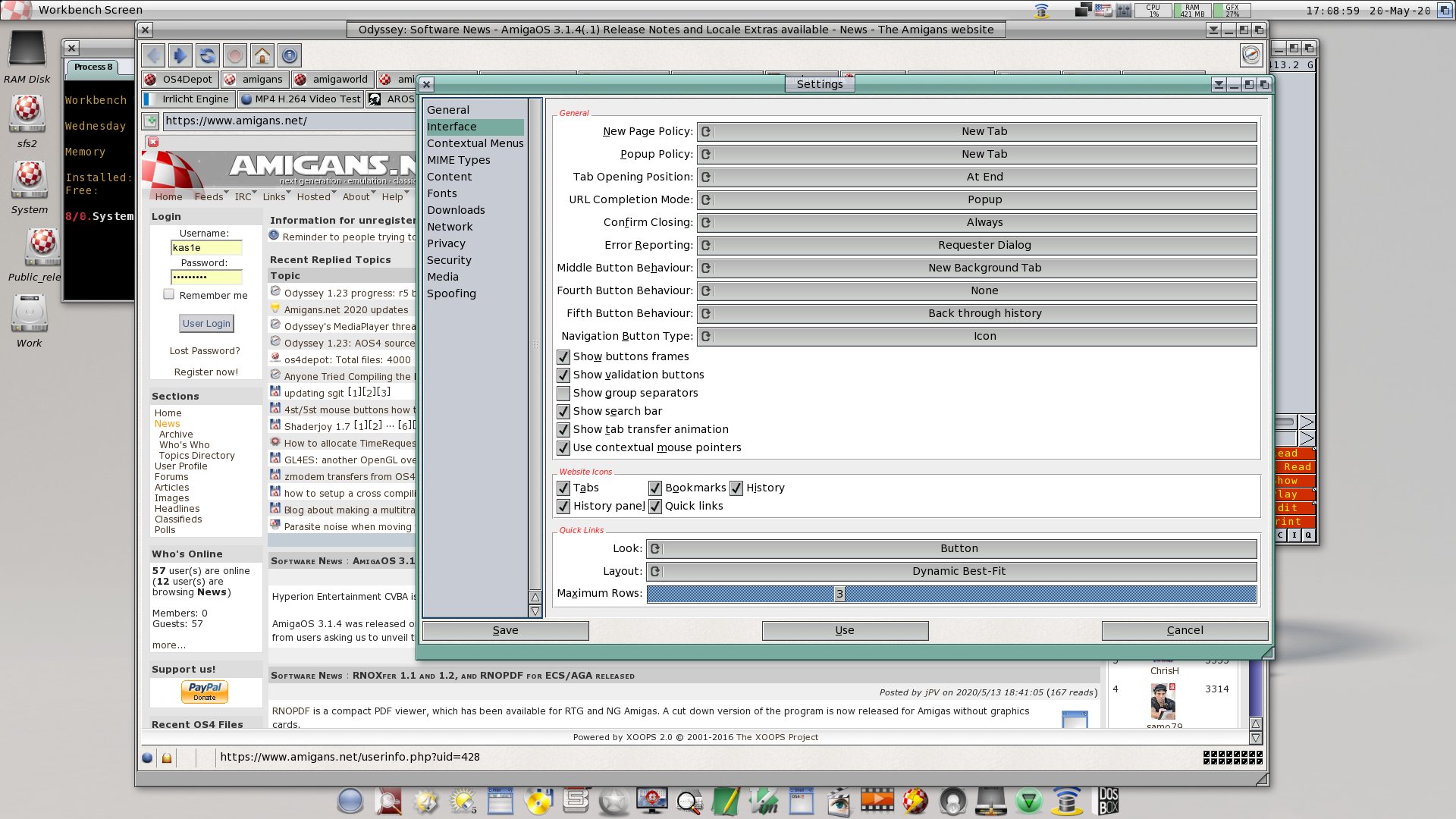
I have added for tests that (click to open in newtab for fullsize):
So for 4st and 5st buttons it have now such options "None", "Back through history" and "Forward through history".
Now questions:
1. is it enough to be like this ? 2. is naming of options ok ? 3. should't we add to 4st and 5st button behaviour the same options we had in middle mouse button behaviour , i.e. "new background tab", "new tab" and "new window" 4. should we add also to middle mouse button those new options as for 4st and 5st buttons, so all 3 buttons will have:
None New background tab New tab New window Back through history Forward through history
But i do not know if it really need to touch 3st button behaviour at all.
5. should't we put away those 3 mouse button settings out of general, so it will be like sub-groups "website icons" , "quick links" area, etc ?
All the suggestions ideas are welcome :)
@Javier Quote:
"Problem" is that url perfs (url.prefs file) only saves the index of the useragent not the full string.
If we have problem with it, maybe we need to update ulr.prefs too ? Or there is only problem if we use only old url.prefs ?
Ok, no problem, but I not sure if some change in MENU (javascript, images, spoof as,...) should change PREFS (window options), if it's that what you mean.
I agree with this. Changing the spoofing menu should not change preferences. The only relationship I would suggest is that the default selection in preferences should select that item in the menu when first started.
If you want changes for given sites to stick then it's done through the URL Settings... menu.
If you want to change the default you do it through preferences.
So for 4st and 5st buttons it have now such options "None", "Back through history" and "Forward through history"
Thanks for working on this. I like it.
Answer to quesitons: Quote:
1. is it enough to be like this ?
I'd say this is sufficient and would accomplish what I was wanting. The only other suggestion I would have is to add a "None" selection to the Middle mouse button setting as well, so it could be disabled too. Anything else is just dependent on how much time you want to spend on this.
Quote:
2. is naming of options ok
Naming is fine. I was trying to think of what else to call it and the only ideas I came up with is. "Previous Page" and "Next Page" or "Back Page" and "Forward Page". It's all just semantics. Pick what you like.
Quote:
3. should't we add to 4st and 5st button behaviour the same options we had in middle mouse button behaviour , i.e. "new background tab", "new tab" and "new window" 4. should we add also to middle mouse button those new options as for 4st and 5st buttons, so all 3 buttons will have:
I'm fine with not adding all options to all buttons. That would be the most flexible and others may disagree, but I think it just adds more complexity. The middle mouse button selections as they currently exist are pretty close to a standard I've seen with other browsers, so I'm fine with just the selections as is, except for adding a "None" to disable.
Quote:
5. should't we put away those 3 mouse button settings out of general, so it will be like sub-groups "website icons" , "quick links" area, etc ?
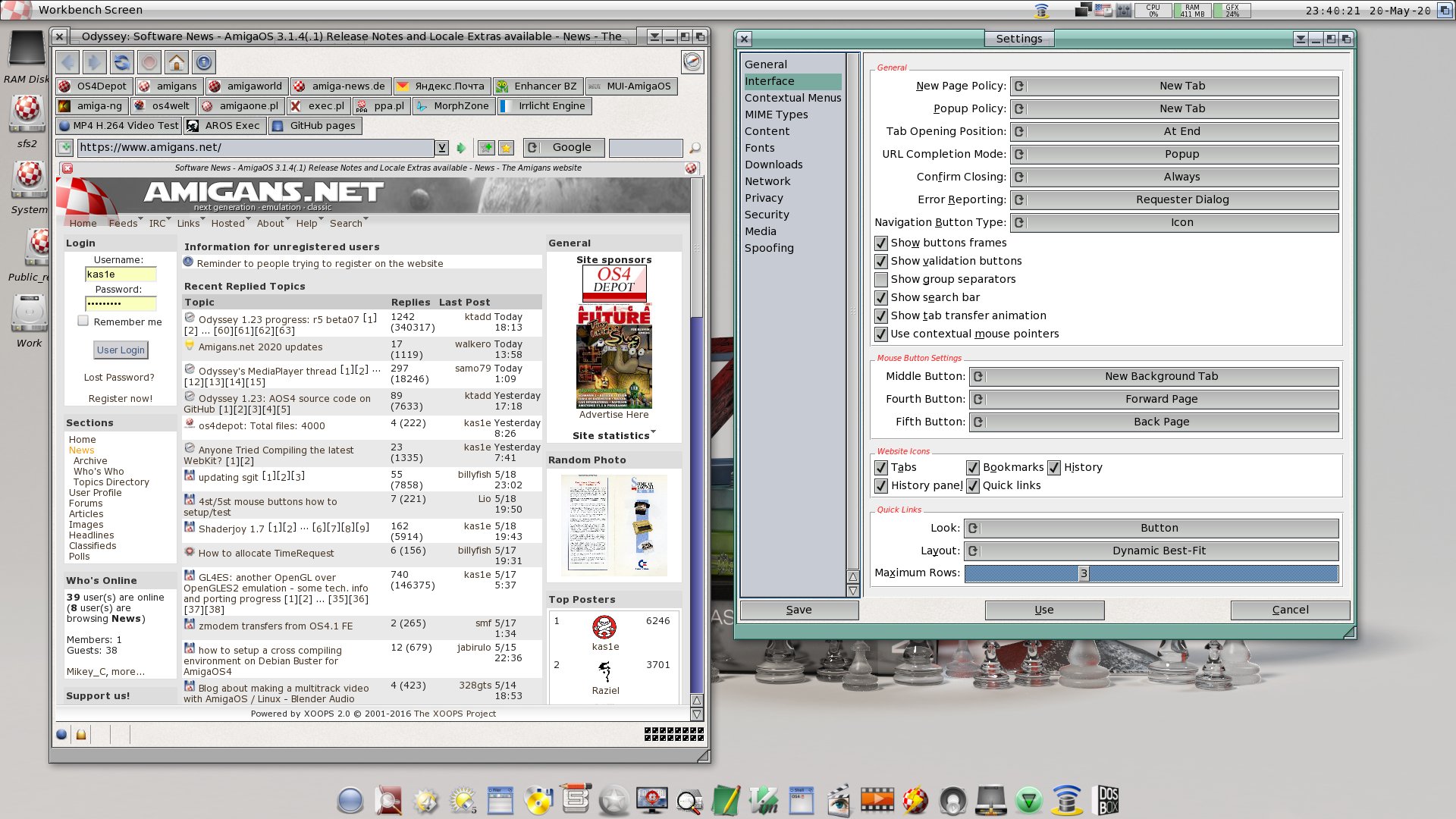
This all depends on how much time you want to spend on it. My thought would be to leave them on the same "Interface" page but create a new "Group" with it's own bevel labeld "Mouse Button Settings" where all the mouse button setting reside. You could then also drop the "Behaviour" portion of the cycle gadget names. (ie. Middle Button, Fourth Button, Fifth Button)
The way you have it is fine. It just depends on how much time you want to spend on it. The above are just my thoughts and certianly others may have other ideas.
@NBache As i say you should install beta7 to a fresh new directory, and then conf by conf update it if you wish from old install. In new one not only new pixman library come, but also useragent.prefs, which contain all the old spoofing string with the same names as before, and they looks the same in menu.
Aha, I did install it in a new dir, but then copied my whole conf dir from the old installation over (after backing up the new conf, of course). My mistake.
I'll try it the other way, thanks for the reminder.
Looks very good, but I think it's getting a bit "massive" such category, maybe splitting to a new one and move some options there.
New category could be TOOLBAR and move there all button/'toolbar options: Navigation button type [@|.....] [ ]Show buttons frame [ ]Show validation buttons [ ]Show group separators And Quick Links group too.
So it will get a less "massive" INTERFACE category.
And maybe move/include to Mouse (Button) Settings group: [ ]Use contextual mouse pointers


 News feed
 OS4 Feedback forum
 OS4Depot Feedback forum
 AmiCygnix forum
 ABC shell forum
 AmiKit forum
 Cinnamon Writer forum
 CodeBench forum
 Digital Universe forum
 Dopus 5 forum
 E-UAE forum
 Gnash forum
 Ibrowse forum
 JAmiga forum
 Odyssey forum
 OWB forum
 Qt forum
 SmartFileSystem forum
 Timberwolf forum
 TouchDevice forum
 TuneNet forum
 Unsatisfactory Software forum
 Donate